


JDX & Workday Integration
How JDX and Workday work together.
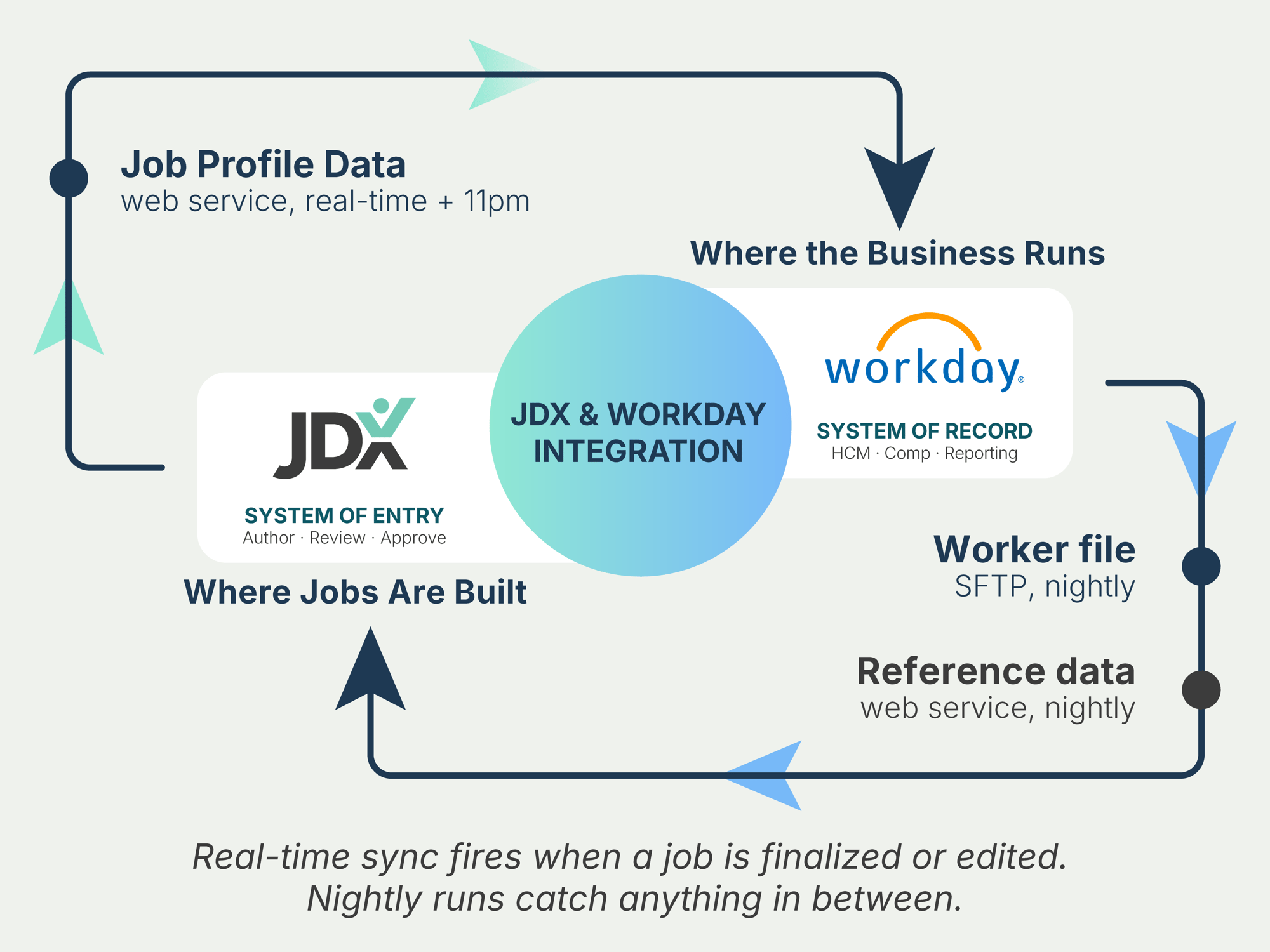
JDX runs a workflow-gated bi-directional integration with Workday. Job content flows from JDX to Workday once it’s been approved. Reference data and worker records flow back nightly. Nothing leaves JDX for Workday until it’s been through JDX workflow — that’s the governance gate, not an afterthought.
★ Silver-level Workday marketplace partner
ARCHITECTURE & DATA FLOW
Three flows. Two delivery mechanisms.
Job data moves between JDX and Workday on two coordinated tracks — one near-real-time, one nightly. Both automated, both governed by JDX workflow on the outbound side.
Outbound
JDX writes Job Profile data to Workday.
Targets the Workday Job Profile object. Job code, titles, descriptions, qualifications, classifications, comp grade — the full field set. Real-time push via Workday’s web service when JDX workflow finalizes a job; 11pm nightly sync as the safety net for anything that landed that day.
Inbound
Workday returns reference data & workers.
Reference data (job families, levels, locations, supervisory orgs) flows nightly via Workday’s web service so JDX dropdowns mirror Workday’s source-of-truth values. Worker file (employee → job mapping) flows nightly via SFTP — standard CSV or XLSX with a documented schema your HRIS team can hand off.
TWO CHANNELS AT A GLANCE
Direction, mechanism, cadence.
Real-time means seconds, not minutes. The 11pm catch-up syncs anything the API didn’t pick up during the day.
| # | CHANNEL | DIRECTION | MECHANISM | CADENCE |
|---|---|---|---|---|
|
1
|
Job Profile sync
|
JDX → Workday |
Workday web service (API) |
Real-time + 11pm catch-up |
|
1a
|
Reference data sync
|
Workday → JDX |
Workday web service (API) |
Nightly |
|
2
|
Worker / employee sync
|
Workday → JDX |
SFTP file delivery |
Nightly |
What’s already governed
Approval is the integration gate.
Jobs and reference data don’t push to Workday until they’ve been approved by JDX workflow. Most integrations sync on a schedule regardless of state. JDX’s posture: ungoverned data should not leave the system. API exports respect approval state — unapproved drafts aren’t exposed to the API surface.
WHAT YOUR TEAM BRINGS
Two roles. A few hours each.
JDX handles all of the JDX-side configuration. Your team brings two people across the engagement.
HRIS / Workday admin
Owns the Workday Integration System User (ISU) account creation, the SFTP endpoint setup (or accepts JDX-hosted SFTP), and field-mapping signoff.
~ 4–6 hours total
Business stakeholder
Owns the field-mapping decisions — what flows, what doesn’t, how content should look in Workday. Typically a Total Rewards lead or a job-architecture owner.
~ 2–4 hours total
IMPLEMENTATION TIMELINE
Four weeks, end to end.
A typical implementation runs four weeks from kickoff to production cutover. Real engagements vary based on the customer’s environment.
| WEEK | CUSTOMER SIDE | JDX SIDE |
|---|---|---|
|
Week 1 · Kickoff & align
|
Walk the field mapping. Decide what flows, what doesn’t, how content should look in Workday. |
Provide field-mapping starter kit; assign integration engineer. |
|
Week 2 · Connect securely
|
Stand up the Workday ISU account; configure SFTP (or accept JDX-hosted). |
Configure the integration on the JDX side. |
|
Week 3 · Test & validate
|
Run jobs and worker data through Workday Sandbox. Verify expected fields land in expected objects. |
Monitor sync logs; resolve mapping mismatches. |
|
Week 4 · Go live
|
Promote to Production. Switch on the daily syncs. |
Hand off to JDX support with a documented runbook. |
SECURITY & COMPLIANCE
Built in. Not bolted on.
Access controls
Role-based access in JDX for field-level visibility on sensitive content (comp, qualifications, internal notes).
Audit trail
Every job change versioned. Every sync logged with timestamp, payload size, and status. Exportable for your compliance team.
Standards
SOC 2 Type II and GDPR compliant.
Authentication
Scoped Workday ISU account; permissions limited to Job Profile, Reference, and Worker domains.
In transit
TLS for the API channel. Optional SSH key + PGP encryption for the SFTP file.
At rest
Encrypted storage on both ends.
Integration FAQ
-
Won’t this duplicate data?
No. JDX is where job content is created and structured. Workday remains the system of record. The integration syncs governed changes — it doesn’t duplicate state.
-
What if the API call fails?
The 11pm nightly catch-up re-syncs anything that didn’t make it through during the day. Failed transactions log the Workday API error code so your HRIS admin can diagnose without leaving JDX.
-
Can we run this in Sandbox first?
Yes — standard practice. Week 3 of the implementation is full Sandbox validation before promoting to Production.
-
Can we control which fields flow?
Yes. The field mapping is reviewed in Week 1 — opt out of any field you don’t want syncing. The default mapping is a baseline built from many Workday customer implementations, not a contract.
-
What Workday environments are supported?
Both Sandbox and Production. Most customers begin in Sandbox during Week 3 for validation, then promote to Production at go-live.
-
Who manages the ISU credentials?
Your HRIS admin creates and rotates the ISU credentials on the Workday side. JDX never holds Workday admin credentials — only the scoped ISU token needed for the configured domains.
Walk through your environment with your CSM.
We’ll scope the timeline, align the field mapping, and confirm the prerequisites for your tenant.