


For JDXpert Customers
You know JDX.
Meet JDX+.
The AI-forward Job Information Management Platform, built on the JDX foundation you already trust and extended across the full job lifecycle.
10 min
Manager to 1st draft
The target for a hiring manager to reach a high-quality draft, guided the whole way. Reviews often run under five minutes per reviewer.
100+
Best-practice fields
A productized field library, out of the box. Configure once, reuse everywhere, and stop rebuilding the same structure per job family.
5 steps
To a job architecture
Blueprint, Framework, Level Guide, Map Jobs, Activate. Not a consulting engagement. Not a spreadsheet that goes stale in six months.
8 to 12 wks
A typical migration
Your current JDX site stays live the entire time. Nothing switches until your team has tested it and accepted it.
WHY WE BUILT IT
Job information keeps getting treated as a project. Projects end. Your jobs don’t.
The part nobody budgets for
Writing and rewriting descriptions. Chasing approvals. Normalizing roles, defining families and levels, mapping thousands of jobs, then answering the same reporting questions every quarter. Manual, repetitive and slow, which is exactly the kind of work software should be doing.
What AI actually changed
Generating a job description got easy. That didn’t make anything better. It made everything downstream harder to ignore: governance, standardization, the link to pay and skills. AI doesn’t fix a fragile system around your jobs. It exposes it.
So we put AI inside the system
JDX+ already holds your structured job data, so AI can work across all of it: drafting inside your standards, recommending architecture with confidence scoring, routing approvals, answering plain-English questions. Your team reviews and decides instead of doing the heavy lifting.
What's JDX+?
Five feature areas work together: architect your job framework, standardize templates, run approvals, answer questions with analytics, and use AI—always inside enterprise controls.
Job architecture shouldn’t
be archi-torture.
Build a governed job architecture once—then keep it current as jobs change, markets move, and strategies evolve.
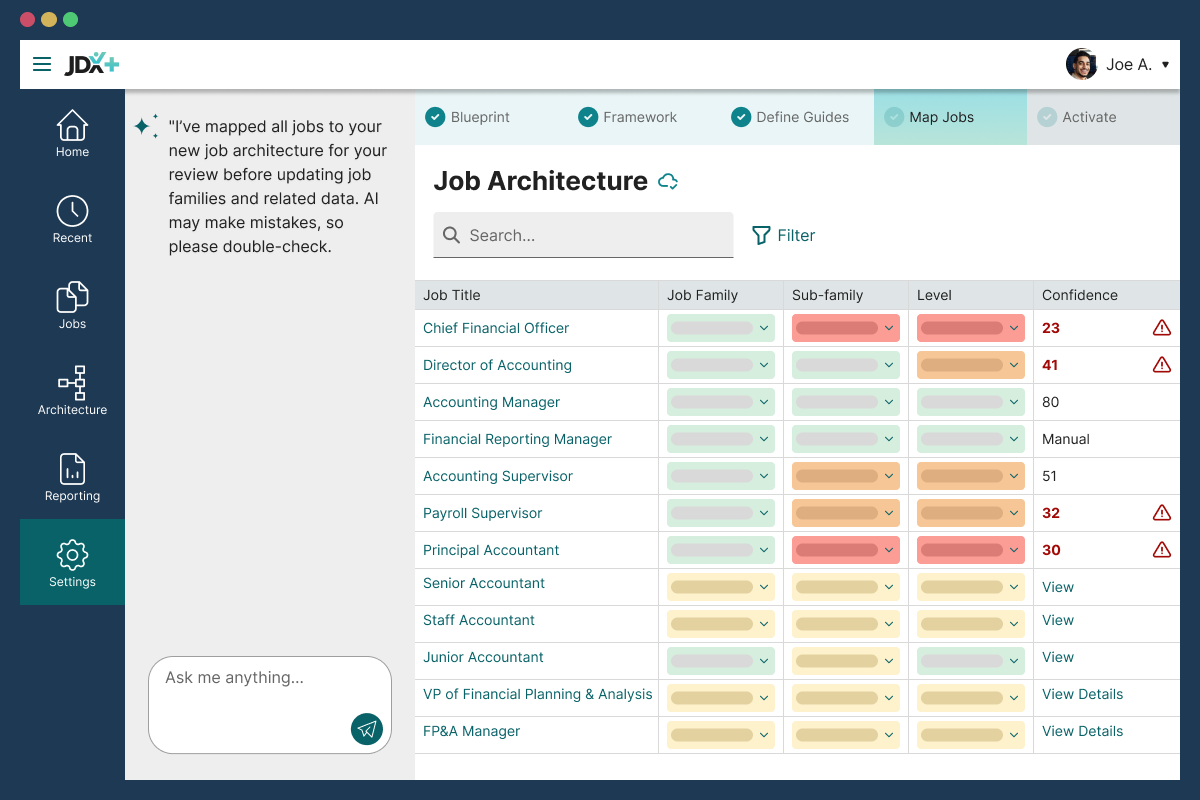
Use what you already have
Upload and reuse existing consultant deliverables instead of starting over.
Guided flow
Blueprint → Framework →
Level Guide → Map Jobs → Activate.
Confidence scoring
Focus review on low-confidence mappings instead of reviewing everything equally.
Maintainability
Keep structure governable over time—without expensive resets.
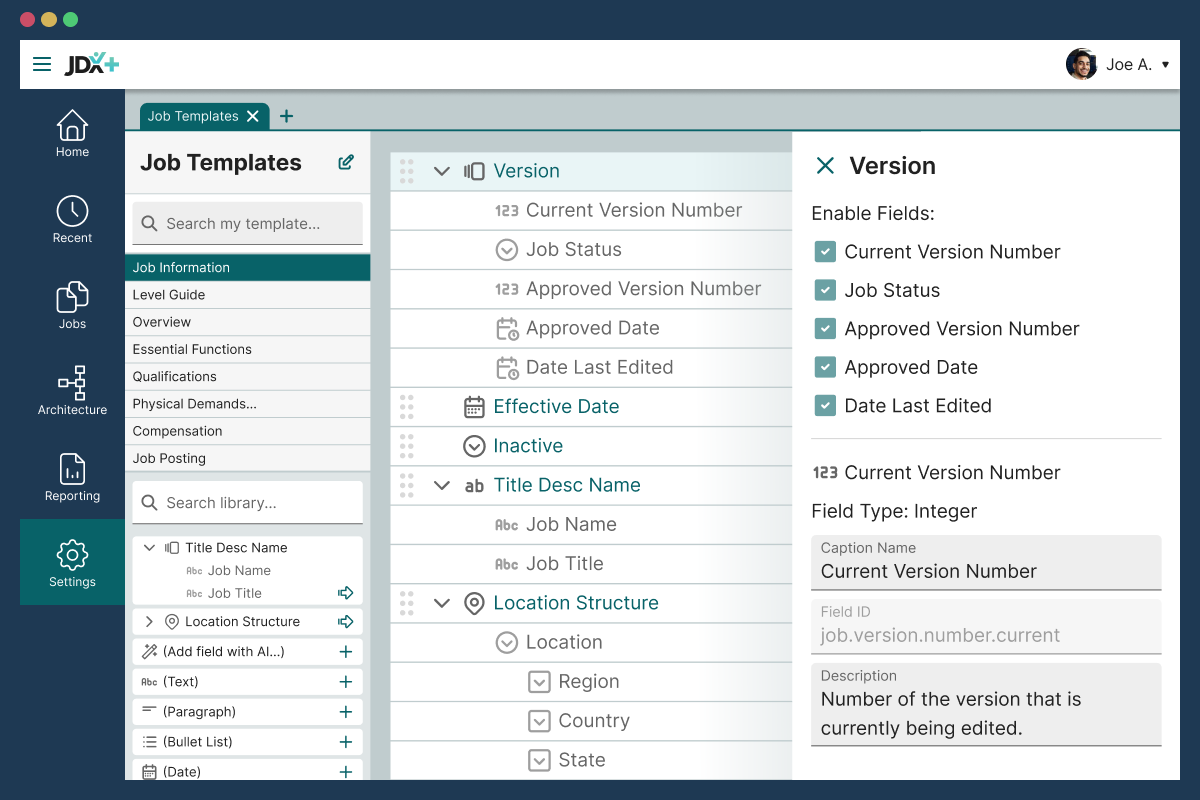
Standardized, expert-designed job templates your teams actually use.
Governed templates give Comp & HR a consistent foundation—while helping managers draft high-quality job descriptions fast.
100+ best-practice fields
Productized field library you configure once and reuse everywhere.
Smart rules & relationships
Conditional logic to show/hide/prefill fields and reduce errors.
AI-ready templates
Governed structure so AI can assist inside your standards (not “AI slop” in a doc).
Role-based controls
Field-level permissions so sensitive data stays protected.
Orchestrate job changes with auditable workflows.
Move from ad hoc pings to predictable, policy-driven approvals—then publish only what’s approved.
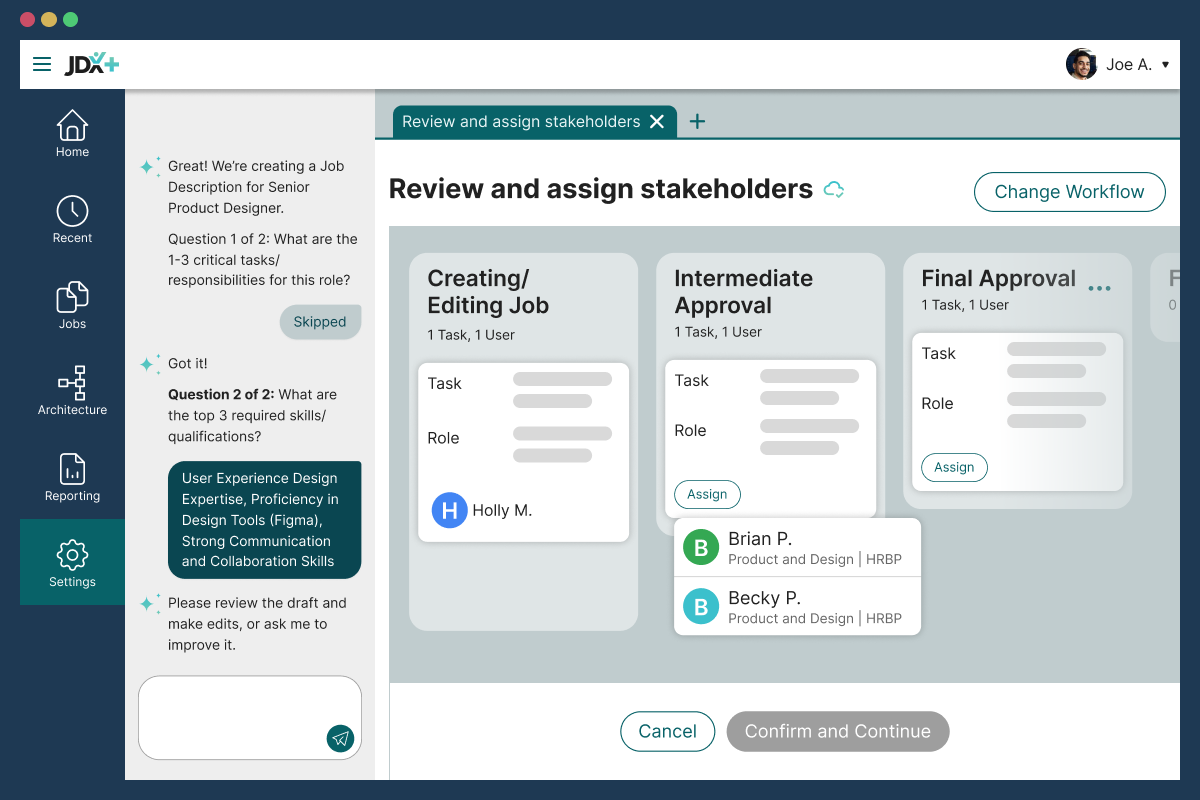
Task-based workflows
Prebuilt 2- and 3-stage patterns to start (create vs edit, etc.).
Notifications & reminders
In-app and email notifications to keep approvals moving.
Audit trails
Every edit, review, and approval captured and exportable.
SLA visibility
Track cycle time and bottlenecks by step to keep work moving.
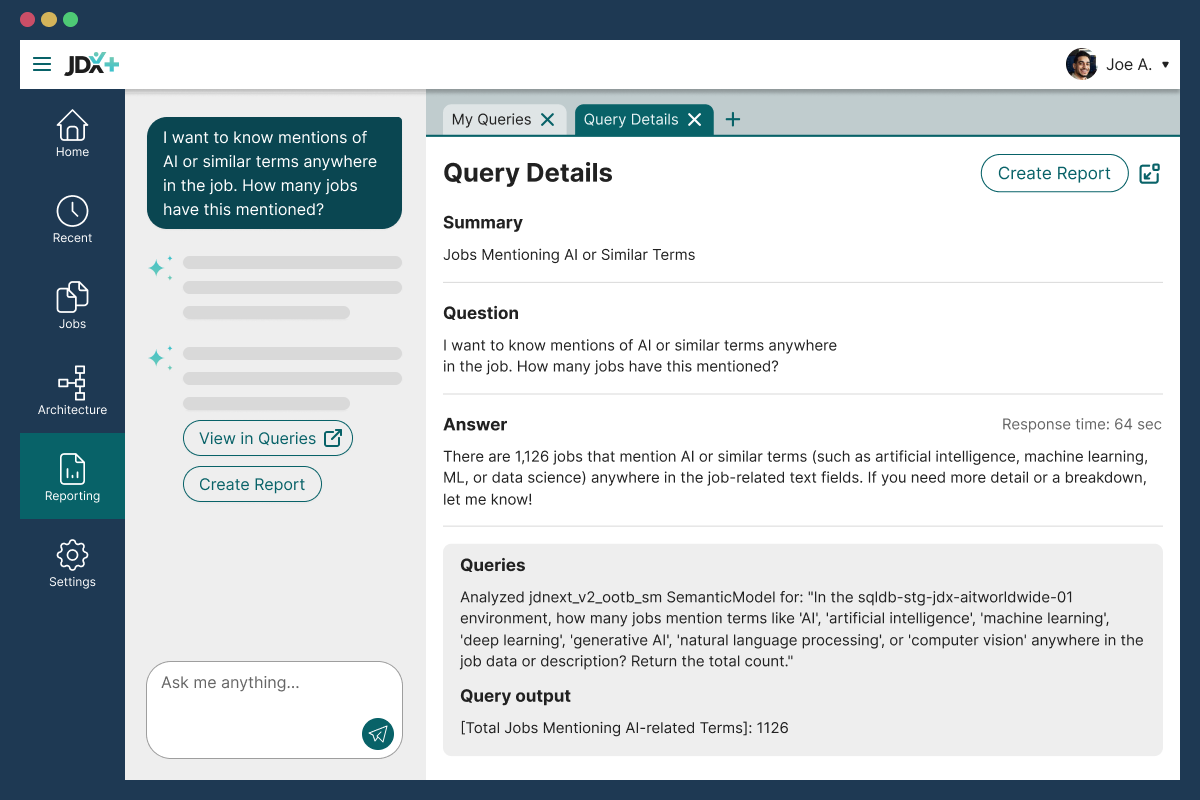
You’ve got the questions.
We’ve got the answers.
Answer job, leveling, and governance questions from structured job data—without spreadsheet projects.
Prompts (ask → answer)
Natural-language questions that return direct answers from job data.
Dashboards & reporting
Out-of-the-box views for workflows and job health/age.
Audit reporting
Who changed what, when, and which approval path it followed.
Permissioned insights
Users only see and analyze what they’re authorized to access.
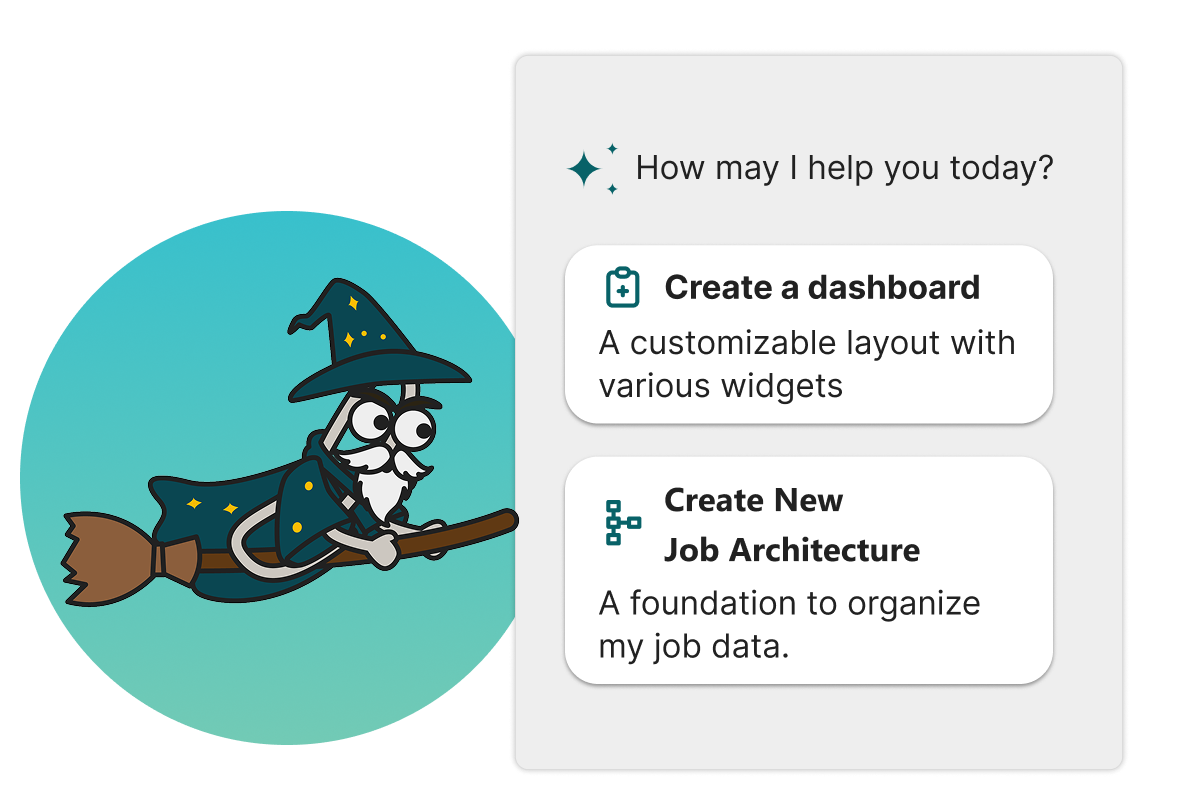
Meet Oz: AI assistance with governance built in.
AI can draft and accelerate work—but humans review and approve, with controls and traceability.
Context-aware help
Guided workflows that prompt for what matters so key fields aren’t missed.
Deterministic grounding
Outputs anchored to governed job information for more consistent results.
AI Safety by design
Enterprise safeguards and required review before publishing.
Traceability
Every AI-assisted change is captured in version history and audit trails.
JDX AND JDX+
Where JDX holds firm and JDX+ goes further.
Two purpose-built products, both sold and supported going forward. JDX is not being retired, replaced or renamed. Moving is a choice.
| CAPABILITY | JDX | JDX+ |
|---|---|---|
|
Governed job data and audit trails
|
Included |
Included |
|
Job authoring and content library
|
AI-assisted |
AI-led |
|
Approval workflows
|
Configurable |
Task-based with SLAs, for 2, 3, 4, 5 or 6 stage workflows |
|
Standardized job templates
|
Custom for every field |
Standardization based on best practices, plus My Fields for the custom fields you need |
|
Certified bi-directional HRIS and ATS integrations
|
Included |
Included |
|
Compensation system integrations
|
Included |
Included |
|
Audience-specific preview and PDF profiles, permission-aware
|
Custom-built |
Included |
|
Simplified, modern UI with mobile
|
Not included |
Included |
|
Job Architecture Module (AI-native, patent-pending)
|
Not included |
Add-on Module |
|
Oz, the AI Wizard
|
Not included |
Included |
|
Advanced analytics and natural-language queries
|
Standard reporting |
OOTB reports included; Advanced Analytics Add-on Module |
|
Skills and competency management
|
Included |
Included |
|
Job version history and compare
|
Included |
Included |
|
Signed employee acknowledgements
|
Included |
Included |
|
Career pathing, and connecting Claude or ChatGPT to your job data
|
Not included |
Coming soon |
How Migration Works
Eight to twelve weeks, and your site stays live the whole time.
No big-bang switch, no weekend cutover. Your current JDX site keeps running while we build, load and test your JDX+ environment alongside it. Multi-business-unit rollouts and deeply customized integrations get scoped separately.
Readiness Audit
We do
- Review your configuration against JDX+
- Flag what needs a design decision
- Build a timeline on your site
You do
- Name your stakeholders
- Tell us what's non-negotiable
Kickoff & Mapping
We do
- Stand up your JDX+ site
- Load users, roles and security groups
- Map sample jobs to template fields
You do
- Provide sample jobs and your user list
- Get testers signed in in week one
Jobs & Conversion
We do
- Import samples and review with you
- Run the full job load on your sign-off
- Tune captions and validations
You do
- Validate the sample jobs
- Run one job through a workflow
Security & Architecture
We do
- Review roles and access controls
- Walk the audit trail and bulk operations
- Hand you a testing script
You do
- Test against the script
- Confirm who sees and does what
Testing & Go-Live
We do
- Refresh the load to clear test data
- Confirm integrations and SSO
- Hand over your go-live pack
You do
- Finish testing and accept
- Pick your go-live date
Your JDX site stays live through every one of these weeks. Nothing switches until you accept.
What comes with you
- Your job descriptions and the structural data behind them
- Your families, sub-families, career streams and levels
- Your users, roles and security groups
- Your content library
- Your certified integrations, confirmed during the audit
What gets rebuilt
JDX+ runs on a productized template and a standardized field set. That shift away from custom-everything is the reason best practice ships out of the box. It also means some of what you configured in JDX gets redesigned rather than copied across: templates, some reports, and workflows that don’t map one to one. Your CSM tells you exactly which, for your site, before you commit to anything.
You set the pace
You don’t have to take everything on day one. Customers adopt JDX+ capabilities incrementally, and the Job Architecture Module is an optional package you pick up when you’re ready. Plan on a few hours a week from your team. Your CSM gives you the real number for your site during the audit.
STRAIGHT ANSWERS
The questions Customers actually ask.
-
Is JDX going away? Are we going to be forced to move?
No. Both products are being sold and supported going forward. JDX is not being retired, replaced, or renamed. We deliberately expanded the product family into two purpose-built offerings for different needs and different stages of maturity. JDX Customers are not being forced to migrate, and JDX keeps receiving product investment and security updates. There is no end-of-life date on the table.
-
Will our templates and reports come across?
Your job descriptions, structural data, users, roles and content library migrate across. Your templates and some of your reports get rebuilt rather than copied. Here's the reason: we made a strategic shift from building custom everything per Customer to productizing the fields and helping you standardize on best practice. Rebuilding the template is how you get that. Your CSM audits your site first and shows you precisely what it means for you.
-
How long does migration take, and how much work is it on our side?
Eight to twelve weeks for most Customers, structured around a readiness audit, kickoff and data mapping, job conversion, security and architecture, then testing and go-live. Multi-business-unit rollouts and deeply customized integrations get scoped separately. Plan on a few hours a week from your team, in weekly or twice-weekly working sessions. Your CSM gives you the real number for your site during the audit.
-
What happens to our JDX site while we migrate?
It stays live and stays yours. Your production site keeps running normally while we build and test JDX+ in a separate environment. Nothing switches over until your team has tested it and formally accepted it.
-
Can we try it before we commit?
There's no self-serve sandbox to log into. What we can do is walk you through the live system with your CSM, where you can stop us, ask about your own setup, and get real answers rather than watch a scripted demo. Ask your CSM to book one. It's the fastest way to find out whether this is worth your time.
-
How is JDX+ priced?
By module. JDX+ is a core platform plus the add-on modules you choose, like Job Architecture and Advanced Analytics, so pricing depends on which of those your organization needs. Discuss it with your CSM. They can price the modules you'd actually use, and tell you which ones you wouldn't.
-
How is the AI different from just using ChatGPT?
If your organization were one person, ChatGPT would be great for writing that job description. You have thousands, and managing thousands is a different problem. Oz drafts from your own approved library first, then from JDXpert's best-practice job data, and every draft lands inside your template mapped to your predefined fields and choice lists. Every job comes out with the same structure. A general chatbot gives you a different shape and a different vocabulary every time.
-
Where does our data go? Is it used to train AI models?
No. JDX+ AI runs on Microsoft Azure AI in a closed, tenant-isolated environment that JDXpert manages end to end. Your data never leaves that environment, and your content is not used to train OpenAI, Anthropic, Google, or any third-party foundation model. Azure AI Content Safety, role-based access controls and SOC 2 apply to the AI environment the same as the rest of the platform. AI interaction logs are kept up to 30 days for troubleshooting and product improvement, then deleted automatically. Every change is traceable through version history and approvals.
-
Can we turn the AI off, or bring our own model?
Not in JDX+. It's AI-enabled by design: the AI is how the platform guides authoring, architecture and workflows, so there's no per-feature opt-out and no model substitution. Every suggestion still needs human review and approval before it takes effect. If your policy prohibits AI in the authoring path, JDX is the right product for you, and it keeps being supported. Separately, connecting your own assistant such as Claude or ChatGPT to your JDX+ job data is on the roadmap.
-
What happens to our HRIS and comp integrations?
Your certified HRIS and ATS integrations are in standard migration scope, and SSO is configured as part of implementation. Compensation integrations depend on which system you run, so if that's how your comp data moves today, raise it early. Integrations are the first thing the readiness audit looks at. Your CSM gives you the specifics for your site, including whatever your IT team needs to see, before you commit to a timeline.
-
Our job architecture isn't structured the way yours is. Does that matter?
Not as much as you'd think. The module starts from what you already have rather than imposing a model, so consultant deliverables, existing leveling guides and point-factor work can be uploaded rather than thrown away. Where JDX+ recommends a level or a mapping, you can override it. And if job architecture isn't your problem right now, skip the module. Plenty of Customers move for the interface and the templates and come back to architecture later.
-
What do we take back to our leadership?
Four things, roughly in the order they tend to land:
1. An interface your managers will actually open, instead of one they email HR about.
2. Workflows and notifications built around tasks, so approvals stop depending on someone chasing them.
3. AI that drafts inside your governance instead of outside it.
4. A job architecture that stays current as roles change, rather than becoming a spreadsheet nobody trusts by Q3.
Then ask your CSM for the audit. Your own numbers are far more persuasive to a leadership team than anything on this page.
Your next step
Start with a conversation.
No scripted demo, no pricing pitch. Your CSM already knows your site, so the conversation starts from what you actually run — not from slides. Bring your questions, bring your skeptics, and walk through:
- What you're using today, and what you're paying for but aren't
- Which JDX+ capabilities would actually matter for your team
- What moving would involve for your site, honestly
- Anything on this page, answered against your own setup